Thursday, May 29, 2025

How to Register for MP CPCT Exam – Step-by-Step Guide एमपी सीपीसीटी परीक्षा के लिए रजिस्ट्रेशन कैसे करें – स्टेप-बाय-स्टेप गाइड

✅ Step 1: Visit the Official Website

चरण 1: आधिकारिक वेबसाइट पर जाएं

🔗 Go to https://www.cpct.mp.gov.in
🔗 यहाँ क्लिक करें – MP CPCT की आधिकारिक वेबसाइट पर जाने के लिए।


✅ Step 2: Click on "Register for CPCT"

चरण 2: "Register for CPCT" पर क्लिक करें

🔘 On the homepage, click on the "Register for CPCT" button.
🔘 होमपेज पर दिए गए "Register for CPCT" बटन पर क्लिक करें।


✅ Step 3: Create a New Profile

चरण 3: एक नया प्रोफाइल बनाएं

🖊️ Fill in your basic details like Name, Date of Birth, Mobile Number, Email ID, etc.
🖊️ नाम, जन्म तिथि, मोबाइल नंबर, ईमेल आईडी जैसे विवरण भरें।

📌 Set a password and complete mobile/email verification.
📌 पासवर्ड सेट करें और मोबाइल/ईमेल वेरिफिकेशन पूरा करें।


✅ Step 4: Login to Your Dashboard

चरण 4: डैशबोर्ड में लॉगिन करें

🔐 Use your registered mobile number/email ID and password to login.
🔐 पंजीकृत मोबाइल नंबर/ईमेल और पासवर्ड से लॉगिन करें।


✅ Step 5: Fill the Application Form

चरण 5: आवेदन फॉर्म भरें

📝 Enter academic qualifications, preferred exam city, and upload photo/signature.
📝 शैक्षणिक योग्यता, परीक्षा शहर की पसंद, फोटो और सिग्नेचर अपलोड करें।


✅ Step 6: Pay the Examination Fee

चरण 6: परीक्षा शुल्क का भुगतान करें

💳 Pay ₹660 using Debit Card / Credit Card / Net Banking.
💳 ₹660 का भुगतान डेबिट कार्ड / क्रेडिट कार्ड / नेट बैंकिंग से करें।


✅ Step 7: Submit & Print Application

चरण 7: आवेदन सबमिट करें और प्रिंट निकालें

🖨️ Review your details and submit the form. Take a printout of the confirmation page.
🖨️ विवरण की पुष्टि करें और फॉर्म सबमिट करें। कन्फर्मेशन पेज का प्रिंटआउट लें।


🗓️ Important Dates | महत्वपूर्ण तिथियाँ

  • Application Window: 28 April – 12 May 2025

  • Exam Dates: 30 & 31 May 2025

MP CPCT: A Gateway to Government Jobs in Madhya Pradesh | एमपी सीपीसीटी: सरकारी नौकरियों की पहली सीढ़ी

📌 What is MP CPCT? | एमपी सीपीसीटी क्या है?

The Computer Proficiency Certification Test (CPCT) is an essential certification test introduced by the Government of Madhya Pradesh to assess candidates’ computer skills and typing proficiency in Hindi and English.

कंप्यूटर प्रवीणता प्रमाणीकरण परीक्षा (CPCT) मध्य प्रदेश सरकार द्वारा शुरू की गई एक अनिवार्य परीक्षा है, जो उम्मीदवारों की कंप्यूटर दक्षता और हिंदी-अंग्रेज़ी टाइपिंग क्षमता को जांचती है।


Why is CPCT Important? | सीपीसीटी क्यों ज़रूरी है?

MP CPCT is a mandatory qualification for clerical and data-entry level government jobs in MP, such as:

MP CPCT मध्य प्रदेश की कई सरकारी नौकरियों के लिए अनिवार्य योग्यता है, जैसे:

  • ✍️ Data Entry Operator (डाटा एंट्री ऑपरेटर)

  • 📠 IT Operator (आईटी ऑपरेटर)

  • 🖋️ Assistant Grade-3 (सहायक ग्रेड-3)

  • 📝 Typist (टाइपिस्ट)

  • 📋 Clerk (क्लर्क)

  • 📍 Patwari (पटवारी)


🧾 Exam Structure | परीक्षा संरचना

1️⃣ MCQ Section | बहुविकल्पीय प्रश्न

  • 75 questions on:

    • Computer fundamentals

    • Logical reasoning

    • General awareness

    • Reading comprehension

    • Mathematics

2️⃣ Typing Test | टाइपिंग परीक्षा

  • 15 minutes each in English and Hindi


🎯 Eligibility Criteria | पात्रता मानदंड

  • 📚 Education: 12th Pass or Polytechnic Diploma after 10th
    शैक्षणिक योग्यता: 12वीं पास या 10वीं के बाद पॉलिटेक्निक डिप्लोमा

  • 🔞 Age: Minimum 18 years
    आयु: न्यूनतम 18 वर्ष


💳 How to Register | पंजीकरण कैसे करें

  • 📍 Visit: cpct.mp.gov.in

  • 💰 Fee: ₹660 (Online Payment)

  • 🗓️ Next Exam: 30th & 31st May 2025

  • 📅 Apply Between: 28th April – 12th May 2025


📃 Scorecard Validity | स्कोरकार्ड की वैधता

The CPCT scorecard is valid for 7 years from the exam date.
CPCT स्कोरकार्ड परीक्षा की तिथि से 7 वर्षों तक मान्य होता है।

Conclusion | निष्कर्ष

MP CPCT is not just an exam—it’s the first step toward a secure government career in Madhya Pradesh. If you’re aiming for roles like Patwari, Clerk, or Data Entry Operator, CPCT is your essential qualification.

MP CPCT सिर्फ़ एक परीक्षा नहीं, बल्कि मध्य प्रदेश में सरकारी नौकरी की ओर पहला क़दम है।


Friday, May 2, 2025

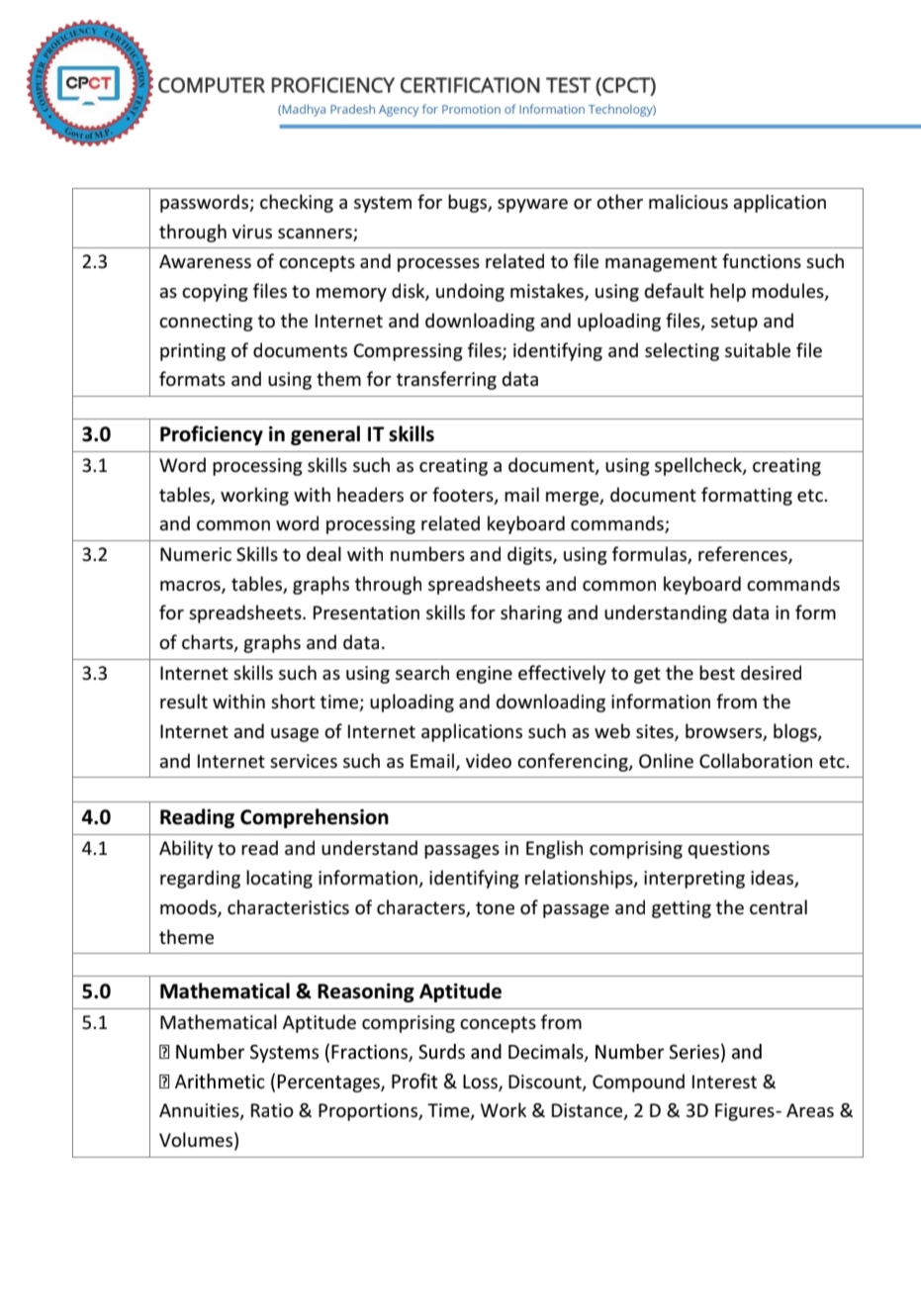
CPCT EXAM MP NEW SYLLABUS

image courtesy - CPCT mp official website cpct.mp.gov.in

Important Dates for CPCT exam 2025

Exam Date30th May and 31st May 2025

Application Start Date28 April 2025

Application End Date12 May 2025

Score Cards are now available for "15th-16th Mar-25 & 21st Mar-25" CPCT Exam

Top 50 Computer Questions for CPCT Exam 2025 (with Answers)

Here are the Top 50 Computer Questions for CPCT Exam 2025 (with Answers) :-

Part A: Computer Fundamentals (Q1–Q15)

1. What is the full form of CPU?
Central Processing Unit

2. Which device is used to input data into a computer?
Keyboard

3. What does RAM stand for?
Random Access Memory

4. Which device is an example of non-volatile memory?
Hard Disk

5. Which is not an input device?
Monitor

6. The main function of the operating system is:
Managing hardware and software resources

7. What is the brain of the computer?
CPU

8. Which software is used to perform calculations?
MS Excel

9. What is the full form of GUI?
Graphical User Interface

10. Which key is used to refresh a web page?
F5

11. What type of software is MS Word?
Application Software

12. What is the full form of WWW?
World Wide Web

13. Which device is used to print documents?
Printer

14. Which part of the computer performs calculations and comparisons?
ALU (Arithmetic Logic Unit)

15. What is the smallest unit of data in a computer?
Bit

Part B: MS Office & Shortcuts (Q16–Q30)

16. Shortcut key to copy selected text:
Ctrl + C

17. Shortcut key to paste:
Ctrl + V

18. Shortcut to save a file:
Ctrl + S

19. Shortcut to undo an action:
Ctrl + Z

20. Shortcut to bold selected text:
Ctrl + B

21. What is the extension of Word files?
.docx

22. What is the extension of Excel files?
.xlsx

23. Which tab in MS Word is used to insert pictures?
Insert

24. What is the default alignment in MS Word?
Left

25. Which function in Excel adds values?
=SUM()

26. Which tab in PowerPoint is used to add new slides?
Home

27. What is the use of Ctrl + P?
To print the document

28. What is the use of Ctrl + F?
To find text in a document

29. How do you align text to the center in MS Word?
Ctrl + E

30. What is the function of a spreadsheet?
To organize and analyze data

Part C: Internet, Email & Cyber Awareness (Q31–Q45)

31. What is the full form of URL?
Uniform Resource Locator

32. What is the full form of HTTP?
HyperText Transfer Protocol

33. What is the full form of IP?
Internet Protocol

34. Which software is used to browse the internet?
Web Browser (e.g., Chrome, Firefox)

35. What is an email?
Electronic Mail

36. What is spam?
Unwanted or junk email

37. What is phishing?
Fraudulent attempt to get sensitive information

38. What is a virus in computers?
A malicious program that damages data

39. What is cloud computing?
Storing and accessing data over the internet

40. What is a firewall?
A security system to protect computers from threats

41. Which key is used to open the start menu in Windows?
Windows Key

42. What is incognito mode?
Private browsing mode

43. Which website is used to send emails?
Gmail.com

44. What is CAPTCHA?
A test to determine if the user is human

45. Which protocol is used to send email?
SMTP (Simple Mail Transfer Protocol)

Part D: Miscellaneous & Revision (Q46–Q50)

46. Which company developed Windows OS?
Microsoft

47. What is software piracy?
Illegal copying of software

48. What is multitasking?
Running multiple programs at the same time

49. What is a spreadsheet?
A grid of rows and columns used to manage data

50. What is the purpose of antivirus software?
To protect a computer from viruses and malware.